Introduction
Your SaaS content is bringing in traffic, but qualified leads aren't keeping up. Some articles have lost rankings, and others target the same keywords.
The problem gets worse as your content library grows. Without a clear picture of what's working, your team spends months publishing new articles while existing pages lose visibility or send visitors away without converting.
A SaaS content audit helps you identify these gaps and decide which pages to update, consolidate, keep, or remove. It also shows you where your content investment can make the biggest difference to qualified leads and pipeline.
In this guide, you'll learn how to conduct a B2B SaaS content audit in six steps, assess SEO and AI-search visibility, and prioritize improvements. You'll also get a free 46-point SaaS content audit checklist to evaluate and score individual pages.
When should you conduct a SaaS content audit?
Here are seven triggers that signal it's time to review your content.
Trigger 1: Your organic traffic declines or stops growing
If organic traffic continues to decline or remains stagnant despite consistent publishing, it's time to review your existing content.
An audit helps you identify declining pages, understand what's causing traffic losses, and uncover opportunities to improve organic keyword rankings. It also helps you identify pages that have lost clicks despite maintaining their rankings, which could indicate changes in search behavior or SERP features.
Trigger 2: Your content attracts visitors but fails to generate qualified leads
If your SaaS blog attracts steady organic traffic but generates few demos or qualified leads, it's time to examine whether your content reaches the right buyers and supports their purchasing decisions.
This disconnect often starts with how teams measure content performance. According to Pipeline360's 2026 B2B marketing research, 40.4% of surveyed marketers tracked page views as a content KPI, while only 19.1% tracked pipeline contribution.
A content audit helps you connect organic traffic with conversions and CRM data. For example, if a sales compensation article attracts relevant buyers but generates few demos, review its product context, CTA relevance, and conversion path before investing in more traffic.
Trigger 3: Your product evolves, but your content doesn't
New features, integrations, pricing changes, and positioning updates can make your existing content inaccurate.
An audit helps you identify these inconsistencies across product pages, integration guides, and comparison articles. Prioritize updates that could influence purchasing decisions and align content with current product documentation and sales messaging.
Trigger 4: Your content library grows without covering critical buyer questions
You might have dozens of educational articles but lack the comparison pages, integration guides, and implementation resources buyers need to evaluate your product. These gaps can drive potential customers to competitors for answers.
Identifying gaps in answer clarity, product information, and credibility helps you determine where to focus your answer engine optimization (AEO) strategy. You can identify missing topics and opportunities to update or consolidate content instead of publishing more introductory articles.
Trigger 5: Your brand is missing from relevant AI-generated answers
Buyers may use ChatGPT, Perplexity, and Google AI Overviews to compare SaaS products, research integrations, and shortlist vendors. If competitors repeatedly appear in relevant AI-generated answers while your product is absent, review whether your content clearly explains its use cases and differentiators.
A content audit helps you identify gaps in answer clarity, product information, and credibility that may affect AI-search visibility. A missing mention alone doesn't prove a content issue.
Trigger 6: Your pages receive impressions but struggle to earn clicks
If impressions are growing but clicks remain flat, investigate what's preventing users from visiting your pages. Your content may rank below prominent results, have unappealing titles, or compete with AI Overviews and other SERP features.
By auditing query-level CTR, rankings, and search intent, you can determine whether your pages need stronger metadata, better intent alignment, or more relevant keyword targeting to earn more clicks.
Trigger 7: You're preparing to scale, launch, or reposition your SaaS product
A major product launch, funding round, market expansion, or ICP change can make your existing content strategy less relevant.
For example, if you shift from SMB customers to enterprise RevOps teams, your content may still emphasize affordability while overlooking security, governance, and complex integrations.
Auditing before a major go-to-market change helps you align your content and AI SEO strategy with your updated positioning, target buyers, and product capabilities.
How to conduct a SaaS content audit in 7 steps?
A SaaS content audit works best when you follow a structured process, from defining your goals and collecting data to identifying gaps and prioritizing fixes.
Here’s how to do it in six steps.
Step 1: Define audit goals and scope
Start by identifying what you want to achieve with your SaaS content audit. Are you looking to recover declining organic traffic, improve demo conversions, identify content gaps, or align existing pages with your updated ICP?
Use the following framework to establish your audit goals and KPIs:
Your audit goals should also reflect your broader SaaS SEO content strategy, so you're evaluating pages against buyer intent, topic priorities, and pipeline contribution rather than traffic alone.
Then define the boundaries of your audit:
- Content scope: Your entire library or selected pages and topic clusters
- Target audience: The ICP, buyer roles, industries, and funnel stages that matter
- Reporting period: For example, the last three complete months compared with the previous three
- Success criteria: The specific search, conversion, or pipeline improvements you're aiming for
As a SaaS content marketing agency, RevvGrowth defines audit goals around what a qualified buyer looks like for each client.
A page attracting 200 relevant prospects may deserve more attention than one bringing in thousands of visitors outside the ICP. That distinction shapes which URLs we review first and how we judge their performance.
Step 2: Build your SaaS content inventory
You need a complete view of the pages you're auditing before you can identify gaps or overlapping content.
You can start with a website crawler like Screaming Frog SEO Spider:
- Enter your website URL in Spider mode and click Start. The free version supports crawling up to 500 URLs
- Open Internal → HTML to review your webpage URLs
- Export the results to Google Sheets or Excel
- Cross-check the export against your CMS and XML sitemap to catch missing URLs
For each URL, record its title, content type, primary keyword, target audience, funnel stage, last updated date, and indexing status.
Step 3: Collect SEO data
Traffic alone won't tell you which content drives business results. Use Google Search Console (GSC), Google Analytics 4 (GA4), and your CRM to connect organic visibility with conversions and pipeline.
1. Analyze organic search performance in Google Search Console
Open GSC → Performance → Search results and compare the last three complete months with the previous three months.
- Enable Total clicks, Total impressions, Average CTR, and Average position
- Open the Pages tab to identify URLs losing traffic or search visibility
- Select a URL and switch to Queries to examine the keywords generating impressions and clicks
- Export the data and add the relevant metrics to your content inventory
2. Measure engagement and conversions in GA4
Go to GA4 → Reports → Engagement → Landing page and filter for Session default channel group = Organic Search. The report's location may vary depending on your GA4 setup. Here, review sessions, engagement rate, demo requests, trial signups, and conversion rates.
This connection between visibility and business outcomes matters. For Atlan, a SaaS data collaboration platform, RevvGrowth's SEO and AI-search program contributed to a 93% increase in organic traffic and more than 6,500 AI-search citations. More importantly, AI-search visibility drove a 25% lift in MQLs.
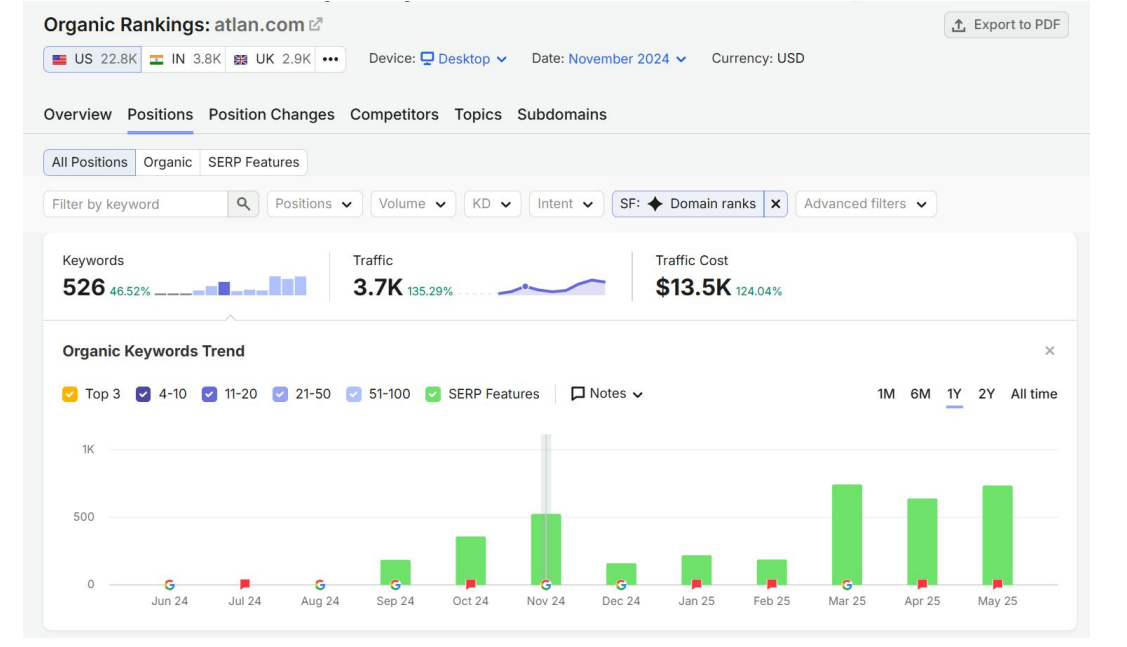
Snapshot of Atlan's organic traffic after collaborating with Revv Growth
The takeaway for your audit is simple: measure which content reaches buyers and which content helps turn that visibility into qualified demand.
Step 4: Evaluate content performance, gaps, and AI visibility
Your audit data shows which pages underperform. Now, find out why and identify the fixes most likely to improve search visibility, buyer engagement, and conversions.
a. Diagnose what's holding your pages back
Compare performance with the previous period or the same period last year to spot meaningful changes.
Next, compare each priority page with current top-ranking results. Check whether it matches the expected content format and covers the questions, features, integrations, and decision criteria buyers expect.
Verify:
- Product details
- Pricing
- Statistics
- Competitor claims
- External sources
b. Find content gaps and overlapping pages
Start with a content gap analysis by mapping your URLs against target keywords, search intent, and funnel stages. Look for three issues:
- Content gaps: Missing topics or buyer questions. For example, you may have educational articles about sales commissions but no comparison page for sales compensation software.
- Content overlap: Articles that cover similar topics without offering distinct value. Differentiate their intent or consolidate them where appropriate.
- Keyword cannibalization: Pages competing for the same search intent, potentially causing Google to rank a less relevant URL.
To investigate potential cannibalization, open Google Search Console → Performance → Search results. Filter by a priority query and check the Pages tab.
Multiple URLs appearing for one query don't automatically indicate cannibalization. Compare the URLs' search intent and performance before deciding whether to update, consolidate, or redirect them.
At RevvGrowth, we review content clusters to understand whether they answer the questions buyers ask as they move from learning about a problem to evaluating solutions.
That same focus on relevant topic coverage informed our broader work with Everstage, where we expanded the content library to 400+ optimized pages, including 40+ long-form articles in one month. During the program, top-three keyword rankings increased from 155 to 436, alongside visibility across ChatGPT, Perplexity, and Gemini.
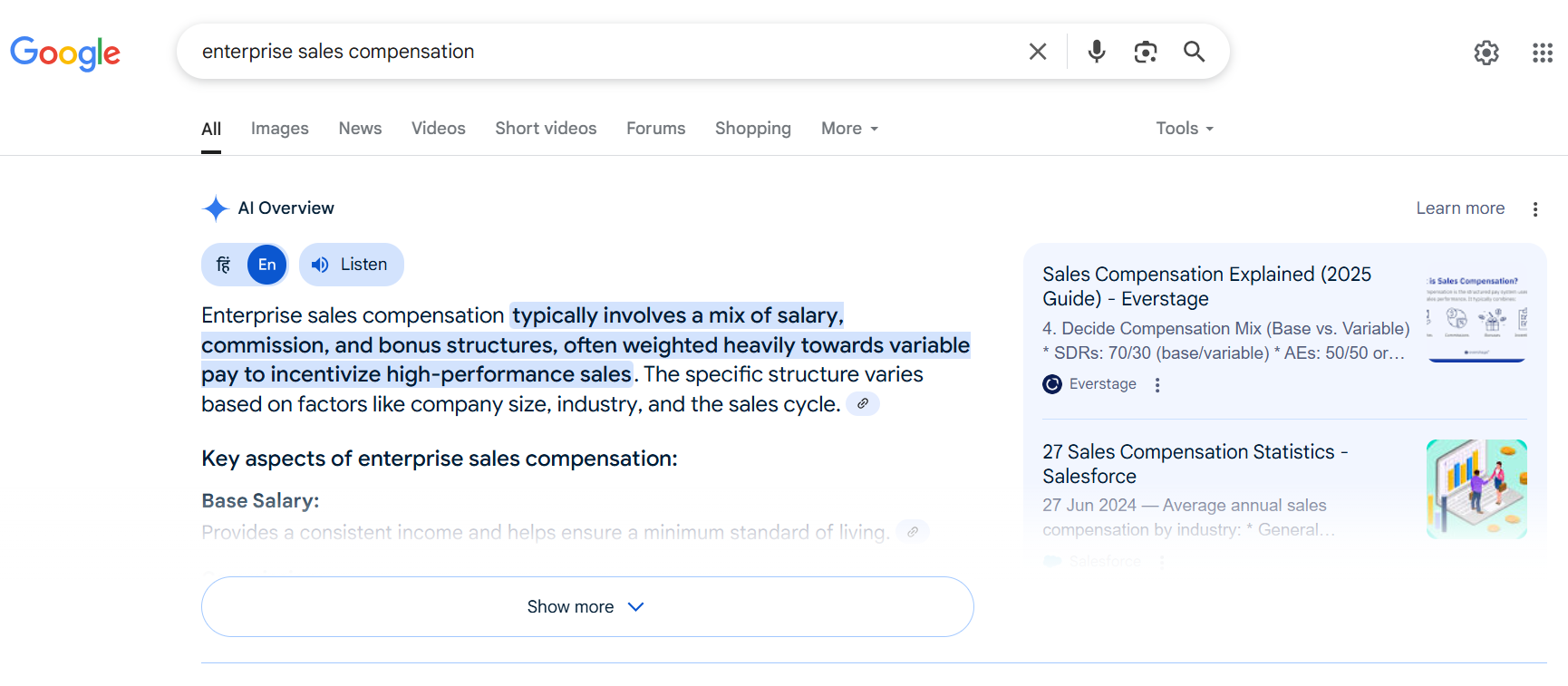
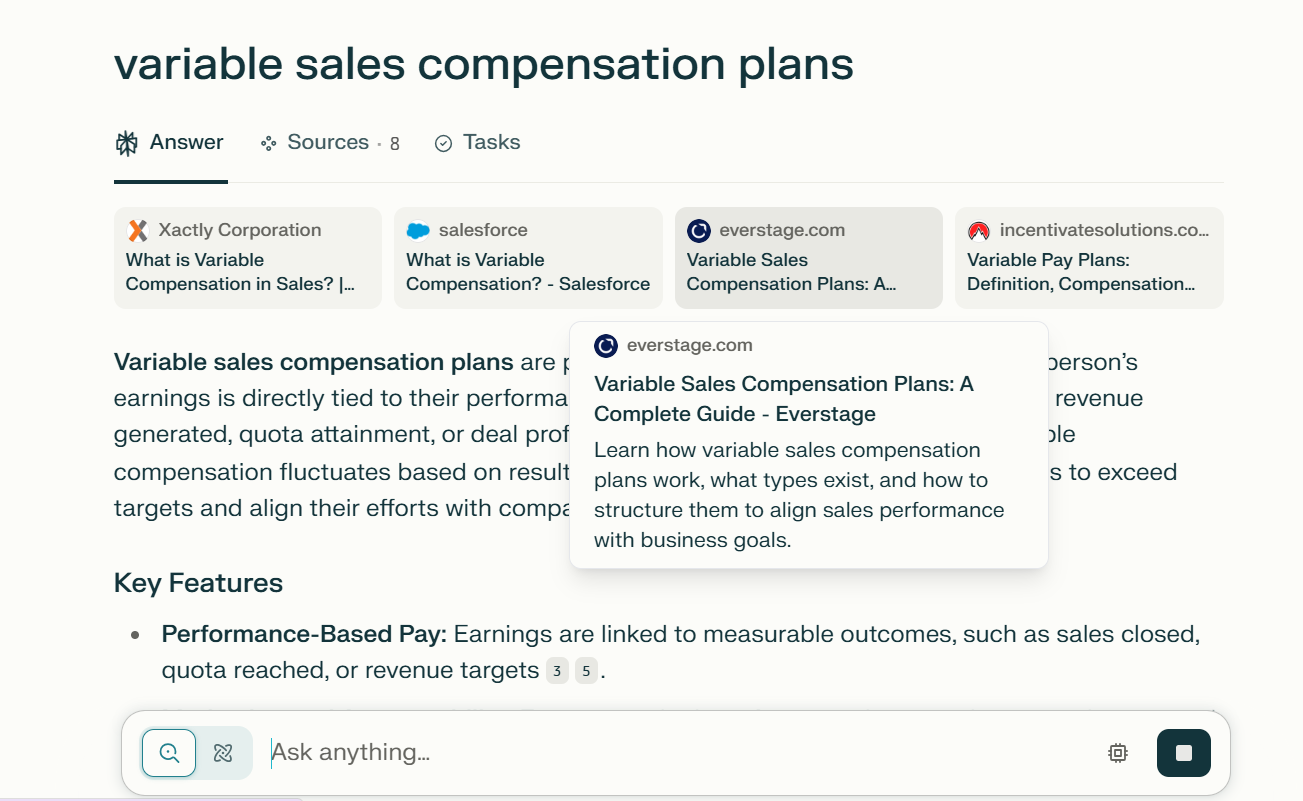
Snapshots of Everstage appearing in AI overviews and Perplexity answers
c. Connect content to conversions and AI visibility
Review demo requests, trial signups, conversion rates, MQLs, SQLs, and pipeline contribution where CRM attribution is available. Test demo forms and trial links to ensure they work correctly. Plus, check whether each CTA matches the reader's funnel stage, and consider assisted conversions before deprioritizing low-traffic pages.
Then, evaluate your visibility in AI search.
Test representative buyer queries in ChatGPT, Perplexity, and Google AI Overviews, where available. Record your findings in a prompt-level tracking sheet.
Check:
- Brand visibility: Does your brand appear in the answer?
- Citations: Which of your URLs and competitors' sources get cited?
- Content gaps: What useful information do cited pages provide that yours doesn't?
- Answer readiness: Does your content provide direct answers, accurate product details, and credible supporting evidence?
- Entity accuracy: Are your product name, features, integrations, and other relevant details represented correctly?
If relevant pages aren't appearing in AI-generated answers, an LLM content readiness audit can help assess whether answer clarity, content structure, or missing evidence needs attention.
When we evaluate optimization opportunities at RevvGrowth, business relevance helps determine priority. A comparison page that attracts qualified buyers may deserve attention before an educational article with more traffic but less influence on purchasing decisions.
Step 5: Assign actions and prioritize URLs
Once you've identified the problems, decide what should happen to each URL.
Use five actions:
- Keep: Retain accurate, relevant pages that serve their intended purpose.
- Update: Improve pages with outdated information, declining visibility, weak intent alignment, or conversion opportunities.
- Consolidate: Combine pages that substantially overlap in content and search intent.
- Redirect: Permanently redirect a retired URL when there's a genuinely relevant replacement.
- Remove: Retire content that no longer serves a useful purpose and has no suitable replacement, after checking traffic, backlinks, and conversions.
Then rank the recommendations using business value, potential impact, and implementation effort.
Step 6: Implement changes and monitor results
An audit only produces value when its recommendations are put into practice.
Turn your prioritized backlog into tasks with owners, deadlines, and clear deliverables. Record baseline metrics before publishing changes so you can assess the results afterward.
At RevvGrowth, our involvement can continue beyond the audit. We turn audit findings into content briefs, create B2B content that converts, coordinate implementation, and track performance against the original goals. This helps SaaS marketing teams execute the work without leaving valuable recommendations untouched.
Turn your SaaS content audit into pipeline growth
Auditing a few blog posts is manageable. But when you're dealing with hundreds of URLs that attract traffic without generating leads, figuring out what needs attention can take weeks.
And even after the audit, someone still needs to update the content, fix SEO issues, fill the gaps, and track whether those changes are generating results.
RevvGrowth is a SaaS content marketing agency that can handle both. We audit your SaaS content to identify what's hurting search visibility, where you're missing qualified buyers, and which pages deserve attention first. Then we help execute the recommendations, from content strategy and writing to SEO, AEO, GEO optimization, and performance tracking.
FAQs