



Introduction
Finally, after months of discussion, you’ve invested in HubSpot, and now, it’s your job to make sure you leverage everything this powerful platform has to offer.
Let’s face it: HubSpot has a lot to offer, but it’s easy to miss the mark if you don’t have a clear onboarding plan.
While in 2025, 93% of Marketing, Content, and Sales Hub customers reported a higher adoption of HubSpot tools, many businesses still fail to use the platform to its full potential. The result? Wasted time, underwhelming results, and frustration across the team.
That’s why we have designed this guide.
We’ll help you take full advantage of HubSpot’s capabilities, from account setup to workflows and integrations. We’ll also walk you through the process step-by-step, ensuring that your team adopts the platform with ease and gets the most out of your investment.
Ready for a smooth HubSpot implementation? Get your HubSpot onboarding plan.
Now, let’s take a closer look at what HubSpot onboarding actually includes
What Does HubSpot Onboarding Include: Key Elements of Successful Onboarding
HubSpot onboarding is the first step in setting up HubSpot CRM to meet your business needs. It includes configuring accounts, customizing workflows, and integrating tools like email, social media, and marketing platforms. The process ensures your team is equipped to use HubSpot’s features effectively.
Onboarding also covers user training, automation setup, and data migration. HubSpot’s onboarding options include self-guided resources and expert-led support, helping you tailor the platform for seamless adoption and long-term success. Understanding these steps ensures your business fully leverages HubSpot’s capabilities from day one.
Here’s an overview of what HubSpot onboarding includes:
- Account and portal configuration: Setting up your account, defining user roles, and configuring domain settings.
- CRM data model and lifecycle setup: Customizing contact properties, deal stages, and lifecycle stages to fit your sales and marketing processes.
- Pipelines, deal stages, and lead management: Structuring your sales pipelines and managing leads effectively through the stages.
- Automation, workflows, and routing logic: Automating processes to ensure timely follow-ups and lead assignments.
- Integrations with your existing tech stack: Connecting HubSpot with tools like email platforms, CRM systems, and analytics tools.
- Reporting, dashboards, and attribution basics: Setting up custom reports and dashboards to track key metrics and improve decision-making.
- User access, permissions, and team training: Ensuring the right team members have access to the right data and providing training resources.
These elements form the foundation of successful HubSpot onboarding, ensuring that your team is fully equipped to drive business growth with HubSpot.
But understanding what’s included is only half the work. The real challenge lies in executing onboarding in the right order without creating rework or confusion.
Let’s explore the HubSpot onboarding process in detail and get your team fully set up for success.
HubSpot Onboarding Process: Step-by-Step Guide
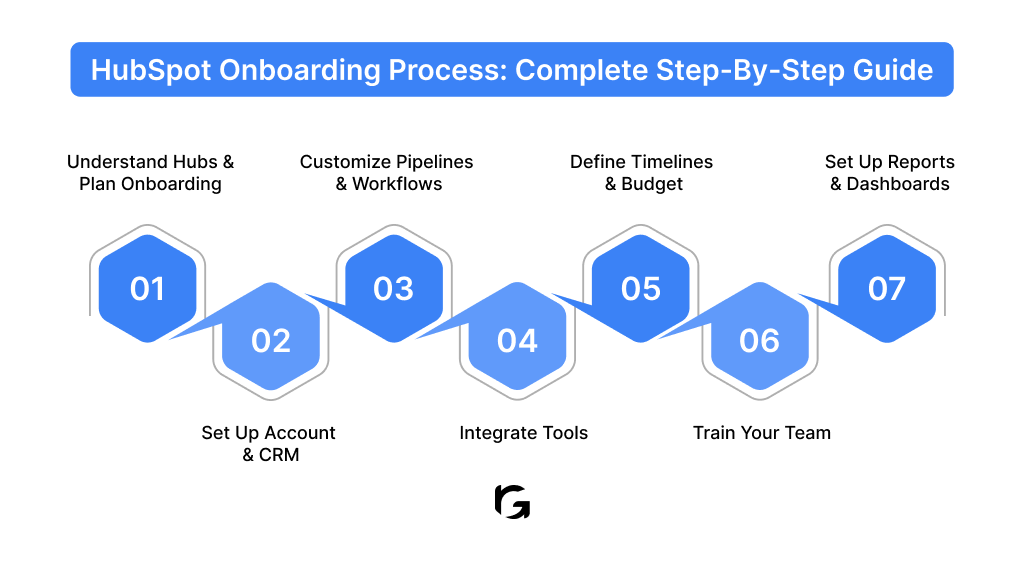
A successful HubSpot onboarding process follows a logical flow, starting with strategy, moving through configuration, and ending with adoption and visibility. Here’s a detailed breakdown of the process, from start to finish.
Step 1: Prepare for Onboarding
Before logging into HubSpot, define the outcomes you expect for your business. These could include generating better-quality leads, creating a more predictable sales pipeline, improving handoffs between teams, or gaining clearer visibility into performance.
Then, understand how HubSpot Marketing Hub fits into your growth motion. Marketing Hub plays a central role in lead capture, nurturing, and attribution.
Knowing which capabilities you plan to use early helps you design workflows, lifecycle stages, and reports that support your long-term strategy instead of working against it.
For example:
- If you're a startup, onboarding might focus more on getting the CRM up and running quickly, with simple automation and basic reporting.
- As a growing business, you might need more customized workflows, deeper integrations with other tools, and more complex pipelines that align with your expanding sales and marketing operations.
- For enterprise-level businesses and companies, your focus will be on ensuring proper data migration from other systems, configuring advanced automation rules, and setting up detailed reports and dashboards for cross-functional teams to use effectively.
Step 2: Set Up the HubSpot Account and CRM
Now, it's time to begin configuring your HubSpot account. Focus on setting up users, permissions, and default settings to ensure smooth access for all stakeholders while maintaining data integrity and security.
Next, focus on the CRM itself. Define contact properties, lifecycle stages, and deal structures that match how your sales and marketing teams actually work. A well-structured CRM ensures teams track the right information at the right time, which directly impacts reporting accuracy and adoption.
Step 3: Customize Pipelines and Workflows
Once the CRM structure is in place, HubSpot onboarding shifts toward efficiency and execution. At this stage, the priority is to turn your CRM from a data repository into a system that actively supports sales execution and day-to-day decision-making.
Your sales pipelines should mirror how deals truly progress in your business.
Review recent closed and lost deals to understand where conversations move forward, stall, or drop off. Then, use those insights to define pipeline stages that help reps quickly identify what action is needed next and help managers spot risks early without digging through records.
Set up automation to assign leads based on ownership rules, trigger follow-up tasks after key interactions, and notify teams when deals change stages. This ensures no opportunity slips through due to manual oversight.
The goal here is not automation for its own sake, but removing friction from daily work.
Step 4: Integrate HubSpot with Other Tools
HubSpot delivers its most value when it connects seamlessly with the tools your teams already rely on.
By integrating email platforms, CRM systems, and marketing tools, your teams can work from a unified view of customer data.
For example, at Revv Growth, we helped Vymo, a Series C-funded sales engagement platform, integrate HubSpot CRM with their existing tools, including Google Ads and LinkedIn. This integration:
- Streamlined their lead management process
- Provided better attribution insights
- Significantly improved their campaign visibility
With all tools connected, their sales and marketing teams worked from a single, reliable source of truth, which ultimately boosted efficiency and reporting clarity.
Tip:
Rather than integrating everything at once, focus on the tools that have the most immediate impact on revenue, customer experience, or reporting. This approach reduces complexity, prevents data silos, and ensures teams can operate from a unified data set, just as we did with Vymo to streamline their operations.
Step 5: Set Realistic Timelines and Establish a Budget
As the person in charge of HubSpot onboarding, understanding the costs and timeline for implementation ensures you can set realistic goals and deliver results on time.
When you account for costs such as licenses, integrations, and data migration early, you can prevent unexpected roadblocks that might delay your project.
Treat HubSpot onboarding as a defined initiative rather than a background task so it receives the time and attention it requires.
Start by setting a realistic timeline that accounts for configuration, testing, and team training, which helps prevent rushed decisions later. Break this timeline into clear milestones to track progress, keep teams aligned, and quickly spot areas that need adjustment.
For example, here’s what a typical HubSpot onboarding timeline looks like at Revv Growth:
Once your timelines take shape, account for costs such as licenses, integrations, data migration, and onboarding support if you plan to work with an agency.
Tip:
Estimate ROI early so each investment ties back to efficiency, revenue, or visibility instead of feature usage alone. When timelines and budgets reinforce each other, onboarding remains focused, measurable, and accountable from start to finish.
Step 6: Train Your Team
Even the best HubSpot setup falls apart if teams don’t know how to work with it confidently.
Once timelines and budgets are in place, shift your focus to the people who will use the system every day. Provide your teams with the necessary training that shows how HubSpot supports their daily workflows and decisions.
Since each team uses HubSpot differently, ensure your training adapts to real responsibilities rather than following a one-size-fits-all approach.
Ongoing learning matters just as much as initial training. HubSpot evolves constantly, and teams benefit from access to documentation, tutorials, and support resources that help them stay effective over time.
Step 7: Configure Reports and Dashboards
Now that your teams are trained and workflows are running smoothly, it’s time to focus on visibility. The goal is to make performance data actionable and aligned with your business goals.
- Start by aligning dashboards with real business goals instead of vanity metrics, ensuring the data supports decision-making rather than surface-level tracking.
- Build sales dashboards that show pipeline movement, deal velocity, and forecast health so reps and managers can act quickly.
- Set up marketing dashboards to track lead quality, conversion rates, and campaign impact, helping teams optimize efforts in real time.
- Create leadership dashboards that offer a clear view of growth, revenue trends, and ROI without requiring deep manual analysis.
Once you’ve walked through the full onboarding process, pause and validate that nothing critical slipped through the cracks.
HubSpot onboarding involves many moving parts, and missing even one foundational setup can create friction later, whether that’s inaccurate reporting, low adoption, or broken workflows.
Here’s a checklist we designed. It brings together everything required to move from setup to confident daily usage, ensuring your HubSpot instance is clean, connected, and ready to scale. Use this as a guide to make sure you don’t miss any key steps.
Now that you've reviewed the key elements of the HubSpot onboarding process, let’s explore the different onboarding options available, so you can choose the best fit for your team’s needs and goals.
Types of HubSpot Onboarding: Options You Can Choose From
HubSpot offers multiple onboarding paths, and choosing the right one depends on your setup complexity, internal expertise, and how quickly you need results.
Here are the two options you can explore:
1. Direct Onboarding with HubSpot
Direct onboarding works well for teams with simple requirements and the capacity to learn independently.
HubSpot provides tutorials, certifications, help docs, and community resources that cover core setup and everyday usage. These resources guide teams through standard CRM configuration, basic automation, and common sales or marketing workflows. But direct onboarding has a few challenges, like:
- Time-consuming: Requires internal effort to figure out setup and troubleshooting without external guidance.
- Complexity limit: Not ideal for teams with complex integrations, large data migrations, or specialized workflows.
- Limited support: Advanced issues may need extra help, which can delay implementation and impact overall success.
2. Onboarding with an Agency Partner
Agency-led onboarding offers a more structured approach, especially when your setup is complex. Certified HubSpot partners provide expert assistance, ensuring your CRM is customized to match your unique business processes, with full support for integrations, migrations, and automation. Onboarding HubSpot with an agency provides you:
- Expert guidance: Agencies bring deep experience and knowledge, ensuring a smooth setup tailored to your needs.
- Faster time-to-value: With a dedicated team working on your HubSpot setup, you’ll see results faster.
- Scalability: Agencies can customize HubSpot to accommodate future growth, including integrating advanced tools and complex workflows.
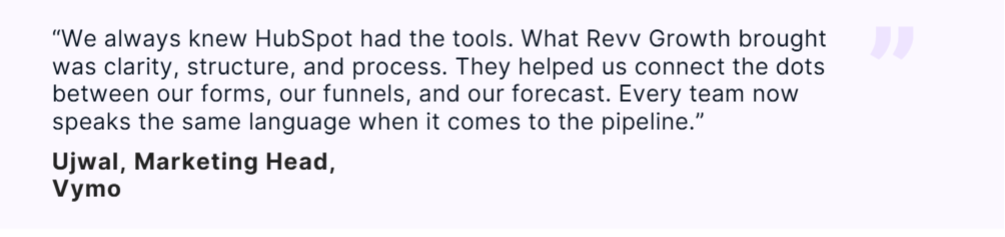
For instance, when Vymo opted for Revv Growth, we helped them integrate HubSpot CRM with multiple platforms, drastically improving lead handoff time from 3 days to less than 24 hours. Here's what our client has to say.
Choosing the right onboarding path depends less on company size and more on operational readiness. Before deciding, you should evaluate a few practical factors:
- Team size: Larger teams benefit from a structured setup and guided training
- CRM complexity: Custom pipelines, automation, and integrations increase onboarding effort
- Data maturity: Messy or fragmented data requires careful migration and validation
- Internal expertise: Limited CRM experience increases reliance on external guidance
- Timeline expectations: Short timelines favor expert-led onboarding
Conclusion: Get HubSpot Live the Right Way
HubSpot onboarding is not about checking off setup tasks or activating features. It’s about building a system your teams trust, return to every day, and rely on to do their best work.
When onboarding is done thoughtfully, HubSpot becomes the source of truth for customer data, the backbone of sales and marketing execution, and a platform that supports decision-making instead of slowing it down.
Many teams struggle not because HubSpot lacks capability, but because early decisions around structure, automation, and reporting weren’t made with long-term usage in mind. Getting those foundations right from day one leads to faster adoption, better visibility, and far less rework as your business scales.
At Revv Growth, we help businesses get HubSpot live the right way, with onboarding that focuses on real workflows, reliable data, and teams that actually use the platform with confidence. If you’re planning to implement HubSpot and want a seamless HubSpot implementation, book a call with Revv Growth now.
.svg)


.webp)
.avif)