



Introduction
Are you implementing HubSpot and trying to avoid data issues, broken automation, and unreliable reports?
HubSpot itself isn’t difficult to use. The real challenge starts when implementation decisions stack up faster than expected. Soon enough, early choices begin affecting data quality, automation behavior, and reporting accuracy.
That’s why a HubSpot implementation checklist matters.
A HubSpot implementation checklist defines the exact steps required to set up a CRM, migrate clean data, configure hubs, and prepare for going live. It covers account setup, lifecycle stages, pipelines, properties, workflows, integrations, reporting, permissions, testing, and training.
We have built this checklist from real HubSpot implementations for our clients at Revv Growth to give you a practical path to implement HubSpot in a way that actually works. Even if this is your first HubSpot implementation, following this right sequence will help you prevent most long-term issues.
Want a review of your current HubSpot setup or plan?
Now, let’s start with what you need to get right before you configure a single setting.
Before You Implement HubSpot: Pre-Implementation Planning
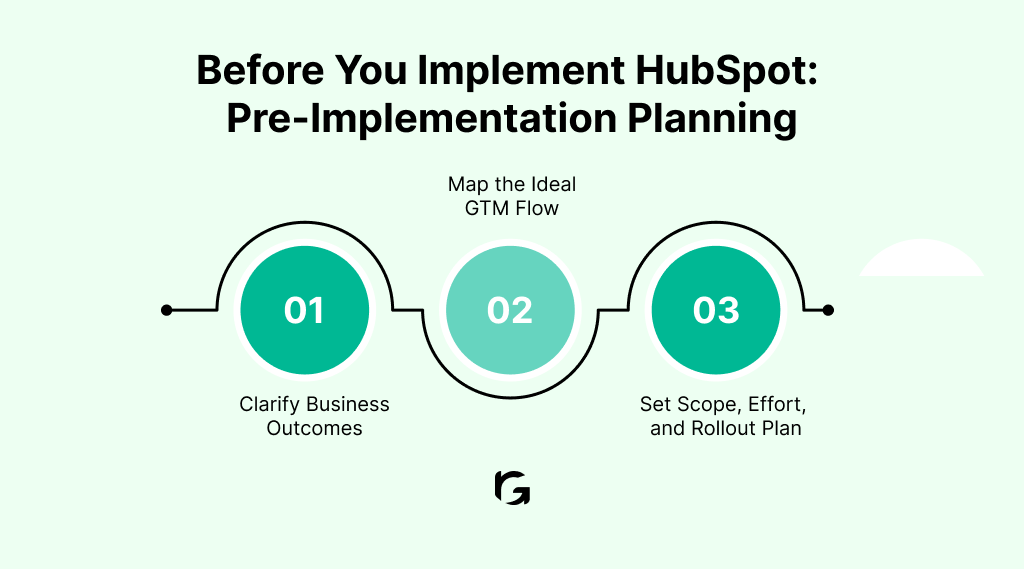
Before you start configuring HubSpot, pause and decide how the system should actually support your business. This planning stage often determines whether your implementation scales cleanly or creates problems later. The decisions you make here directly affect data quality, reporting accuracy, automation reliability, and long-term adoption.
- Clarify Business Outcomes:
Define what success looks like in the first 60–90 days, such as improving pipeline visibility, lead quality, attribution clarity, or forecast reliability.
Once those outcomes are clear, translate them into CRM structure through lifecycle stages, deal stages, required properties, and core reports. This ensures HubSpot supports real decisions, not just activity tracking.
- Map the GTM Flow:
Next, map your ideal go-to-market flow end to end. Think through how leads move from capture to qualification, sales handoff, opportunity management, and post-sale.
At each step, decide where automation should speed things up and where human judgment still matters. Just as important, define the data that must be present before a record moves forward, so reporting holds up as volume grows.
- Set Scope and Ownership:
Finally, set clear expectations around scope, effort, and rollout. What starts as a simple CRM setup often expands into data migration decisions, automation dependencies, and integrations that redefine where truth lives.
Align teams early on timelines, responsibilities, and trade-offs. This reduces rushed decisions, prevents rework, and keeps the implementation grounded in reality. At this stage, it should be clear who owns the CRM structure, automation changes, reporting definitions, and data quality.
Once you have clarity on scope, structure, and ownership, you can move into the setup phase.
HubSpot Implementation Checklist: Step-by-Step Setup
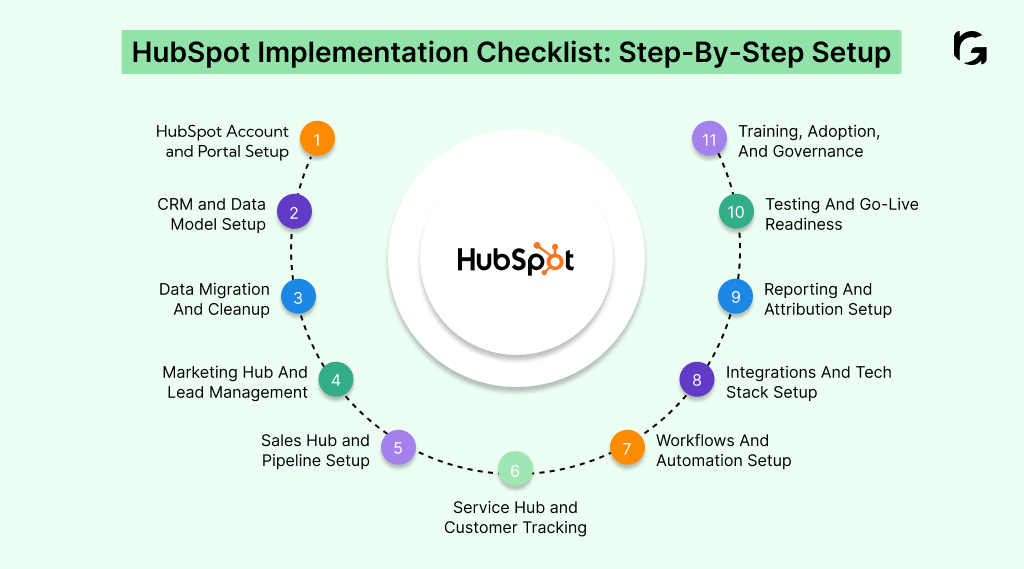
The following HubSpot implementation checklist defines the exact steps required to set up HubSpot correctly from planning to going live. It covers account configuration, CRM structure, data migration, lifecycle stages, pipelines, workflows, integrations, reporting, and governance.
You can use this checklist to configure Marketing, Sales, Service, and CMS Hubs without breaking data or reports. Now, let’s get started.
Step 1: HubSpot Account Setup and Portal Configuration
Start by setting up your HubSpot account and portal configuration. This stage is the foundation of your entire HubSpot system. Decisions made here affect data security, compliance, and how safely teams can operate inside the CRM.
If you rush this step, teams either gain too much access too early or struggle later with locked-down permissions and broken tracking.
So, focus on getting the foundation right:
- Define user roles, teams, and permission sets based on real responsibilities, not job titles
- Configure GDPR, consent, and regional privacy settings before importing data or launching campaigns
- Connect domains, authenticate email sending, and install tracking code across all live websites and subdomains
You can move forward confidently when:
- You test permissions using real user scenarios and confirm that nothing critical breaks
- Tracking fires consistently across all key pages and conversion points
- Email deliverability checks pass before any outbound or automated campaigns go live
Step 2: CRM Foundation and Data Model Setup
This step determines whether your CRM supports your go-to-market motion or becomes a source of friction. You should design the data model around how you actually sell and service customers, not around default HubSpot structures.
Build the CRM deliberately:
- Align standard and custom objects to your business model and revenue motion
- Create a property schema with consistent naming, clear definitions, and validation rules
- Define lifecycle stages and lead statuses that clearly indicate ownership and the next required action
You know the CRM foundation works when:
- Every property exists for reporting or automation, not future assumptions
- Lifecycle stages remove ambiguity instead of creating debate
- Records clearly show who owns them and what should happen next
Step 3: Data Migration and Historical Data Cleanup
Once your CRM structure is defined, the next risk is whether historical data actually respects that structure.
Data migration is often where trust in the system is either earned or lost. If you treat migration as a one-time import, reporting and automation issues tend to surface weeks later. You should approach it as a controlled process that protects data accuracy from day one.
Prepare your data before migration:
- Inventory all source systems so no critical data gets lost
- Map fields carefully, normalize values, and define deduplication rules
- Import data in phases for contacts, companies, and deals to reduce risk
You can trust the migration when:
- You keep a pre-migration snapshot available for rollback
- Sample records behave correctly across lifecycle stages and pipelines
- Leadership reports match expectations without manual spreadsheet fixes
Step 4: Marketing Hub Setup and Lead Management
Once your CRM structure and data foundation are stable, you can focus on how leads enter and move through the system. Marketing Hub setup is not just about capturing demand. It is about qualifying demand in a way that sales trusts and marketing can scale without constant rework. When this step lacks structure, lead volume grows, but confidence drops.
Set up Marketing Hub to scale:
- Configure forms, CTAs, landing pages, and conversion tracking around a unified lead structure
- Align lead scoring with your ICP and real buying intent, not vanity engagement
- Build reusable segmentation lists that support campaigns across channels
- If you’re using CMS Hub, validate that pages, tracking, forms, and attribution follow the same data and lifecycle rules as the CRM.
Marketing operates independently when:
- Scoring thresholds reflect actual sales capacity
- Campaigns launch without structural CRM changes
- Lead quality remains consistent as volume increases
Step 5: Sales Hub Setup and Pipeline Configuration
With demand flowing in reliably, the next test is whether sales can trust what happens next. Your sales pipeline is only useful if it reflects how buyers actually move toward a decision. When pipelines mirror internal tasks instead of buyer progress, forecasts become unreliable, and leadership starts questioning the numbers.
Focus on building pipelines that sales can forecast against:
- Align deal stages to buying stages, not internal sales activities
- Define clear entry and exit criteria, so reps know exactly when a deal can move
- Enable playbooks, snippets, and meeting tools to support consistency without slowing reps down
Your pipeline stays healthy when:
- Deals move forward because buyers take action, not because reps update fields
- Forecast changes follow real deal movement instead of optimism
- Sales leaders trust pipeline reports without asking for manual explanations
Step 6: Service Hub Setup and Customer Experience Tracking
Service Hub connects post-sale activity back to retention, expansion, and long-term revenue. If support data stays outside the CRM, you lose visibility into customer health and miss early warning signs. You should set up a Service Hub so every interaction adds context.
Configure Service Hub to capture meaningful signals:
- Define ticket pipelines, priorities, and SLAs that reflect real support workflows
- Set up shared inboxes, chat, and chatbot routing so issues reach the right teams quickly
- Tie feedback surveys to lifecycle stages so responses carry business context
Service data becomes actionable when:
- You test SLA timers using real scenarios, not assumptions
- Support interactions appear clearly on contact, company, and deal records
- Service metrics feed reporting that leadership actually reviews
Step 7: Workflows, Automation, and Lifecycle Management
Automation should reduce manual work without creating hidden risk. When you automate before clarifying ownership and structure, workflows start conflicting, lifecycle stages update unpredictably, and teams lose trust in the system. You should automate deliberately and document every decision.
Use automation where it adds clarity:
- Route leads and notify teams based on explicit rules
- Automate lifecycle stage updates only when conditions are unambiguous
- Build cross-hub workflows that support end-to-end processes
Automation stays under control when:
- Every workflow has a clearly documented purpose
- Re-enrollment and exit rules prevent loops and surprises
- No two workflows attempt to update the same fields differently
Step 8: Integrations and Tech Stack Alignment
Integrations define how data moves across your systems and where truth lives. When ownership is unclear, integrations quietly corrupt data and create reporting conflicts that surface months later. You should design integrations as systems with rules, not just connections.
Document every integration clearly:
- System involved
- Objects synced
- Sync direction
- Source of truth
- Sync frequency
- Field ownership rules
You prevent silent data conflicts when:
- You avoid bi-directional sync unless ownership rules are explicit
- Sync failures trigger alerts instead of going unnoticed
- Teams know exactly where data should be updated and why
Step 9: Reporting, Dashboards, and Attribution Setup
Reporting isn’t optional. It is the proof that your implementation actually works.
In fact, HubSpot data shows customers using cross-hub reporting see a 5× higher deal close rate, but only when lifecycle and source data are consistent.
If dashboards and attribution do not hold up at go-live, teams lose confidence fast and start questioning every number that follows.
Start by building the dashboards each team needs to do their job:
- Marketing dashboards that show lead flow, MQL quality, and campaign ROI
- Sales dashboards that track pipeline health and forecast accuracy
- Leadership dashboards that provide funnel performance and revenue visibility
Then focus on the reports that tie everything together:
- Lifecycle conversion from Lead to MQL to SQL to Customer
- Pipeline velocity to understand how deals actually move
- Source and campaign attribution that connects activity to revenue
Attribution works only when the structure supports it. Map UTMs to CRM properties, tie campaigns directly to lifecycle stages, and test real customer journeys end to end. When a lead converts, moves through the funnel, and closes, you should be able to explain exactly where it came from without manual interpretation.
Step 10: Testing, QA, and Going-Live Readiness
This step protects you from discovering problems only after teams depend on the system. Even well-designed HubSpot setups fail when teams skip structured testing and assume production will behave the same way as the setup.
Before going live, test the full system end-to-end:
- Run real journeys from lead capture through closed-won to confirm data flows correctly
- Validate permissions so users see and edit only what they should
- Test notifications and automation to ensure timing, logic, and ownership behave as expected
You also need to plan for failure, because edge cases always surface:
- Document a rollback plan in case data or automation behaves unexpectedly
- Test recycled leads, reopened deals, reassigned owners, and unusual handoffs
You are ready to go live when edge cases behave predictably, marketing, sales, and operations agree the system reflects how they actually work, and all teams formally sign off, knowing what will and will not change after launch. This is the point where HubSpot becomes safe to rely on for real decisions.
Step 11: Team Training, Adoption, and Governance
Going live is not the finish line. It is the moment daily habits begin shaping data quality and long-term trust. Without training and governance, even a strong implementation slowly degrades as teams work around the system instead of inside it.
Train teams based on how they actually use HubSpot:
- Deliver role-based training so each team learns only what matters to them
- Record sessions so knowledge does not disappear when roles change
- Reinforce how workflows, lifecycle stages, and reporting connect to daily work
Governance keeps the system stable as your business evolves:
- Create SOPs for CRM usage, automation changes, and reporting updates
- Define a clear change request and approval process, so fixes do not introduce new problems
You can track adoption health over time:
- At 30 days, most users actively work in HubSpot every week
- At 60 days, marketing campaigns and sales pipelines run fully inside the system
- At 90 days, teams rely far less on spreadsheets and side tools
This is how HubSpot stays reliable months after implementation, not just impressive on launch day.
As you work through this checklist, one thing becomes clear. HubSpot implementation moves beyond configuration very quickly. It turns into system design, validation, and coordination across teams. Decisions about data structure shape automation.
Automation influences reporting. Reporting determines trust. Once teams start using the system daily, any gap becomes visible. This is often when teams choose to work with a HubSpot implementation partner. Not because HubSpot is hard to use, but because getting it right requires experience across CRM design, data migration, attribution, and cross-team alignment.
A clear example of this is how Revv Growth partnered with Vymo.
Although Vymo had chosen HubSpot, the team faced common scale challenges, including fragmented data, inconsistent lifecycle definitions, manual handoffs, and unreliable attribution.
Revv Growth addressed these issues by following the structured approach outlined in this checklist, starting with GTM and lifecycle planning and moving through CRM setup, data migration, integrations, automation, reporting, and training. A phased rollout allowed validation at each stage, resulting in:
- Faster and cleaner lead handoffs
- Clearer pipeline visibility
- Standardized, reliable reporting
- Improved SDR productivity
More importantly, HubSpot became a system that teams trusted for day-to-day and strategic decision-making.
This reflects a broader pattern. HubSpot implementations rarely fail because of missing features. They fail when structure and validation are skipped. For teams operating at scale or running aggressive demand generation, working with an experienced HubSpot agency often helps prevent costly rework later.
Implement HubSpot Without Costly Rework: Partner with an Expert Team
A successful HubSpot implementation is not measured by how quickly you go live. It is measured by how confidently your teams rely on the system months later, when forecasts matter, attribution gets questioned, and leadership expects clear answers.
When every step is clearly scoped, validated, and governed, HubSpot becomes revenue infrastructure rather than operational debt.
Data stays consistent, automation behaves predictably, and reporting reflects reality instead of assumptions. When HubSpot sits at the center of your go-to-market strategy, it deserves the same rigor you would apply to any core business system.
If you want HubSpot to support real revenue decisions without months of rework, it helps to work with a team that has already seen where implementations break. Teams like Revv Growth help design and implement HubSpot as a system teams can trust long after going live, not just a tool that looks configured.
Book a call with Revv Growth experts today to test your current approach and identify gaps before they turn into months of rework and missed insights.
.svg)


.webp)
.avif)